Search

Fantagian

Fantage Blog

Tag

fantage guide

Bingo for 3/8/16

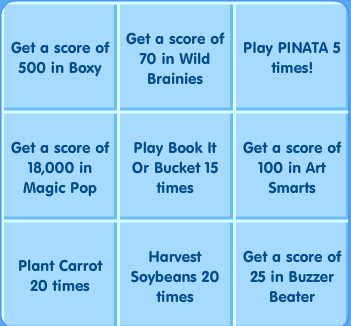
Seems as if Bingo has moved to Tuesday, anyhow, here is the bingo grid, enjoy!

Screenshot_51

Soybeans take 1 hour so plant those first BEFORE you start bingo, don’t start till they can be harvested. Speed at least 2 of them up if you can because there is only 18 plots. After you harvest them plant Carrots but speed 2 up so you can plant 2 more quite quickly.

To get that score in Wild Brainies do Addition III (Level 3)

If you are not good in Art Smarts, just do what I do. Open a separate screen and type in the artist name under images if the painting comes up then you have your answer.

Magic POP move your character to the far right (your right) corner on the screen and hold your hand on the space bar. That’s it, repeat for all rounds.

Have fun!

~Gianna4125

Level with Gia! Day 1

Since it’s Monday, I decided to start off a week with tasks. You can follow along or not.

This should only take about 30 minutes of your time. I suggest Following along on a low server. I personally would add one pet game and Fashion show but only if your serious about leveling. Both of those take enormous amounts of time and commitment.

1.) Log in and go straight to pet school to check in!

2.) Complete mini quest

3.) Go to the arcade and Play: Fruit Stack, Snack Tac Toe, Memory Mix Up, and Jigsaw Jigsaw. remember to score in top 3.

If you have completed these task you will have scored 8 levels today. See you tomorrow!

~Gianna4125


Leveling with Gia!

I’m slowly developing a step by step guide to leveling.  Everyone can level with a little discipline.  I’m going to share my tips and tricks to get stuff done.  So in this post we are gonna discuss the Attendance Medal and Miniquest Medal.  To finish these medals you have to follow through with my instructions everyday.

1.) When you first log in, your first order of business will be to go to pet school and check in.  To max this medal you must log for 100 days consecutively if you miss a day you start back at one and trust there is nothing worst than logging in 99 days straight and forgetting the last day. Then you have to start from 1 again 😦  I have maxed this medal for 2 people besides myself and have learned that I cannot trust the other person to log themselves in.

2.) After you check in at the pet school do your miniquest questions. If you have a little time you can also play 1 pet game or 1 fashion show or fashion battle. Only after these are done can you socialize.

Have fun!

~Gianna4125

New Rares & New Furniture

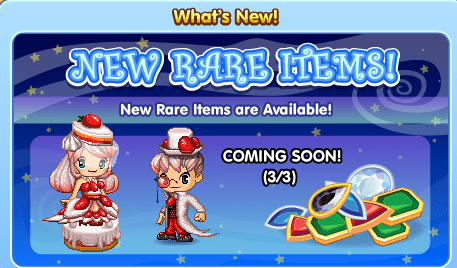
Looks like new rare items will be coming out on 3/3. Cannot wait to see what Mmajid and Trixie2000 style these with.

Screenshot_40
Looking cute!!

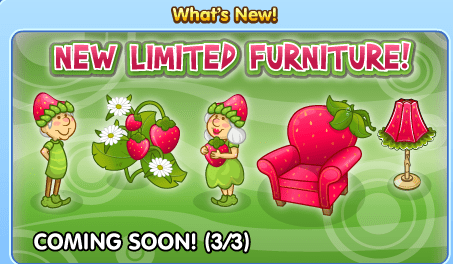
New limited furniture is being released also at Ottomans. Time to furnish the Strawberry house.

Screenshot_41
Sweet enough to eat!


New Bingo Grid for 3/1/16

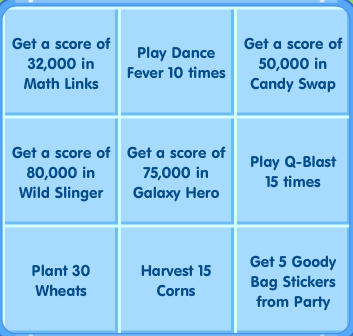
The new bingo grid is finally up. Leap year must of confused the bingo elves.

Screenshot_42

This was an easy Bingo for a change.

I simply planted the corn and played a few games then came back harvested the corn and planted the wheat. Parties were popping up all over by then so I just went to all of them. Lucky for me people were giving out stickers. 🙂  Dance Fever was a drag but it was only 10 times. Q-blast went by quickly as I just killed my non repeatedly. The ONLY game I had issues with was Candy Swap.  If not for that game I would have been done in 30 minutes. 😦

Good Luck!

~Gianna4125

#Levels Explained

So after like 5 hours, I’ve come up with an order, which I believe repeats itself, for the hashtags. If you’re wearing the right t-shirt, while the hashtags on, you’ll get a level!


SWAG BAE BFF LOL OMG OUO YOLO BRB FAN – Repeat

There are 9 hashtags, and the hashtags change half hourly, at #:26 and #:56. This means that every 4 and a half hours, the hashtag will be repeated. This is really handy to know if you’re a non-member and want to know when the “Fan” hashtag is up so you can level.

#FAN times(all in Fantage Standard Time): Friday-9:26pm, Saturday-1:56am 6:26am 10:56am 3:26pm 7:56pm 11:56pm, Sunday: 4:26am I’ll add more later.

You know what’d be really embarrassing? If Fantage switched things up.
-Agnt007

Blog Help: How to make gifs

As requested by min11s14 I’ll show everybody how I make gifs. Gifs are a set of pictures that are saved as a files, and flick through in a loop.

There are many ways to make gifs, but a lot of them require downloading software to do it. But honestly I couldn’t be bothered with that, so I’m going to use a website.

Step 1. Decide whether you’re going to use a video or pictures for your gif

Step 2. Video: Record a video of what you want your gif to be. Make sure it’s short, otherwise it will take a long time to upload your gif.
Pictures: Take screenshots or collect photos of that you want to be in the gif.

Step 3. Video: Go to http://ezgif.com/video-to-gif Click “Choose File” and select the short video you recorded. Now click  the blue button “Upload”. You may have to wait a while now.
Picture: Go to http://ezgif.com/maker Click “Choose Files” and choose your photos for the gif. Now click the blue button “Upload”. Depending on how many pictures you’re using you have to wait a minute for them to upload. Tip: To select multiple photos hold Ctrl(Cmd on Mac) and click the photo you want to add.

Step 4. Video: Choose from what time in the video you want your gif to start and end. You can watch your video to see the time at which you might want it to start and end. Don’t worry about the other settings, click the blue “Convert to Gif” button.
Picture: Drag and drop the photos into the order you want them to show in the gif. Click the blue “Animate It” button. If the pictures are flicking too fast or slow, change the number in the “delay time” box.

Step 5. Save your gif or click one of the options below the gif to modify it in other ways.

Done!!! Did I forget anything? I know this can be complicated, feel free to leave a comment and I’ll try to help you.

-Agnt007 Continue reading “Blog Help: How to make gifs”

SWFs Part 2

While I’ve known about SWF’s for a long time, I’ve recently found a very old post on Fantage Forum with more Fantage resources. Get HYPED editors and item pack makers. You can get official already clear .png’s of Fantage clothes, accessories, moodies and more with ALL of the movements (wave, cry, etc.). I’ll tell you how to find them after the “continue reading” jump.
Continue reading “SWFs Part 2”

Game Guide: King Me

This was the hardest game for me to get a high score for the Game Medal (Top 3) in. But, I worked out the strategy to it, and now, with a little skill to begin with, getting a high score is relatively easy. Originally I had thought your score would be higher if you won faster, or with more pieces, but no. The way to high score is…get as many of your pieces to the other end of the board as possible. If you want to get a high score for positions 1,2, or 3 go to a server with not many people on it. It’s important to know that if someone moves into your path, it will force you to take that piece (If there’s a space behind it). Here’s the video of me playing it, I believe if you copy my exact moves, you will get the same score (Not that it’s that great).
-Agnt007

Create a website or blog at WordPress.com

Up ↑